Authentication
Authentication is the process of verifying that a user who attempts to sign in to a resource is who they claim to be. You can customize user authentication based on your security needs by configuring policies and rules.
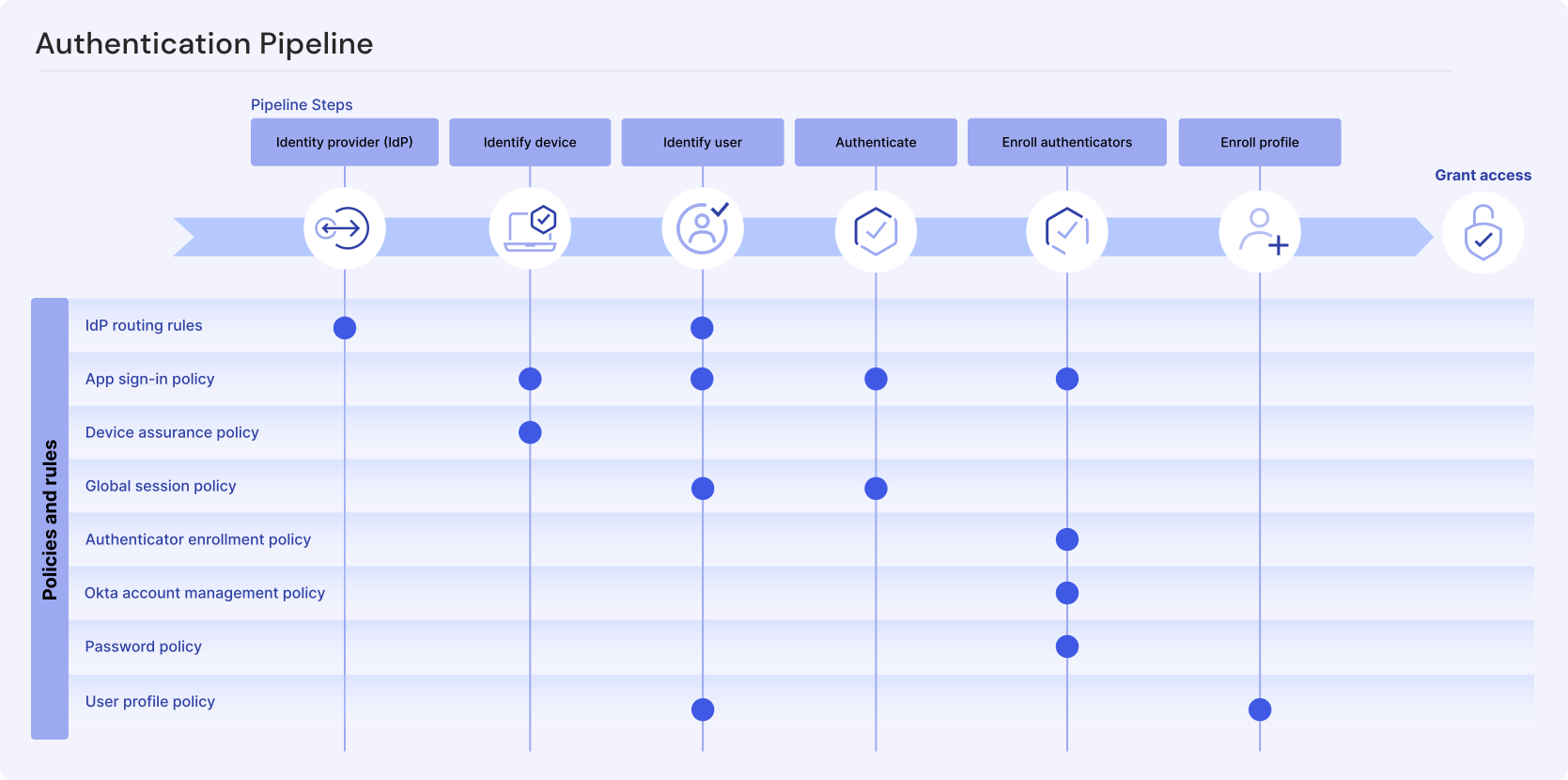
- Configure identity providers
- Allow users to sign in to Okta by first authenticating through an approved identity provider. See Configure identity provider routing rules.
- Identify the user's device
- Verify security-related device attributes as part of your app sign-in policies. See Create an app sign-in policy and Add a device assurance policy.
- Identify the user
- Configure policies to ensure that the user signing in to an app is also the person who owns the account. See Create an app sign-in policy and Create a global session policy.
- Authenticate the user
- Configure policies to verify that the user meets specific requirements and specify how frequently they're prompted for re-authentication challenges. See Create an app sign-in policy and Create a global session policy.
- Enroll the user's authenticators
- Configure MFA to add another layer of security when a user signs in. See Authenticator enrollment policies, Okta account management policy, and Configure the password authenticator.
- Enroll the user's profile
- Collect required user attributes so they can access your website or app integration. See Create a user profile policy.