Generate a random password
Use the Okta password generator to create strong and secure random passwords for your apps.
Prerequisites
- The supported browsers are: Internet Explorer 11, Firefox, Chrome, and Safari.
- Your admin configured your permission to set username and password.
Procedure
- Sign in to an app on your Okta dashboard.
- In the app, go to the change password page.
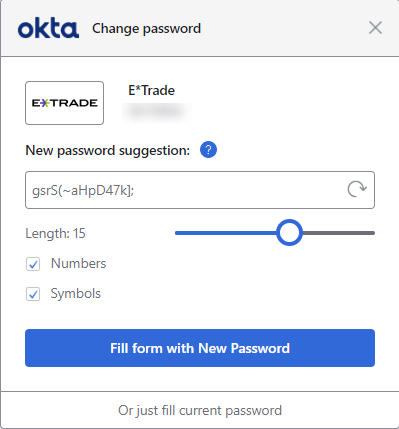
- As you type the password, the Okta
Change password window pops up. Choose any of the following options:
-
To accept the suggested password, click Fill form with New Password.
-
To generate a new random password, click the refresh icon.
-
To change the password complexity, use the controls to configure the password length, and the use of numbers and symbols in the password.
-
To keep your current password, click Or just fill current password.
-
Related topics