Okta Managed MCP Server overview
Learn how the Okta Managed MCP Server connects LLM clients to Okta APIs so you can manage your org using natural language.
Early Access release
Licensing requirements
- The Okta Managed MCP Server requires a subscription to IT Products - Okta Managed MCP Server, plus at least one of the following:
Okta Managed MCP Server - Core IdentityOkta Managed MCP Server - Identity Governance
- Core Identity requires an existing subscription to Universal Directory (UD), Single Sign-On (SSO), Multifactor Authentication (MFA), Adaptive Multifactor Authentication (AMFA), or Lifecycle Management (LCM).
- Identity Governance requires an existing subscription to Okta Identity Governance (OIG).
- The Okta Managed MCP Server isn't available for Okta for Government Moderate (FedRAMP Moderate, HIPAA), Okta for US Military (DoD IL4), or Okta for Government High (FedRAMP High).
- Okta Managed MCP Server is a self-service Early Access feature. To enable it, go to in the Admin Console and turn on the following features:
- For IAM tools -
Okta Managed MCP Server - Core Identity - For OIG tools -
Okta Managed MCP Server - Identity Governance
- For IAM tools -
Overview
The Okta Managed MCP Server connects your LLM client to Okta APIs. It allows you to manage your org using natural language across Identity and Access Management (IAM) and Okta Identity Governance (OIG) modules. Instead of navigating multiple Admin Console menus or writing API calls, you can ask an AI agent to query user profiles, check app assignments, review governance records, and perform tasks like creating a user or checking group membership.
Traditional identity automation and Okta Open Source MCP Server deployments have the following challenges:
- Complex custom integrations: You must write and maintain custom code to connect your AI agents to APIs. This includes handling API formatting, security policies, and token management.
- Manual setup and maintenance: You must manually install Python and manage package dependencies for Okta Open Source MCP Server.
As a cloud-hosted service, Okta Managed MCP Server requires no local installation. All requests are authenticated in real time based on the scopes attached to your access token and user permissions.
For a comparison of hosting, setup, and ideal use cases for the Okta Open Source MCP Server and the Okta Managed MCP Server, see Choose a deployment option.
For a full list of supported capabilities, see Okta Managed MCP Server supported features.
To set up and start using the Okta Managed MCP Server, see Getting started.
Benefits
- Fast, zero-infrastructure setup
- No local installation is required. Connect your LLM client and start onboarding immediately.
- Improved LLM performance
- Reduce token usage and AI hallucinations with scope-based tool loading and response minification.
- Strict schema validation
- The server enforces JSON schema definitions for every tool input. Requests with unexpected fields, unsupported parameters, or invalid values are dropped before reaching your org.
- Parameter sanitization
- The server scans all string inputs and removes characters that could introduce command-injection risks before passing data to the Okta API.
- Least-privilege access control
- Every action maps to the authenticated user's OAuth scopes, so the AI agent can access only explicitly authorized tools and APIs. Short-lived tokens from OIDC link every action to an identity and limit exposure from long-lived credentials.
Architecture overview and how the server works
How it works
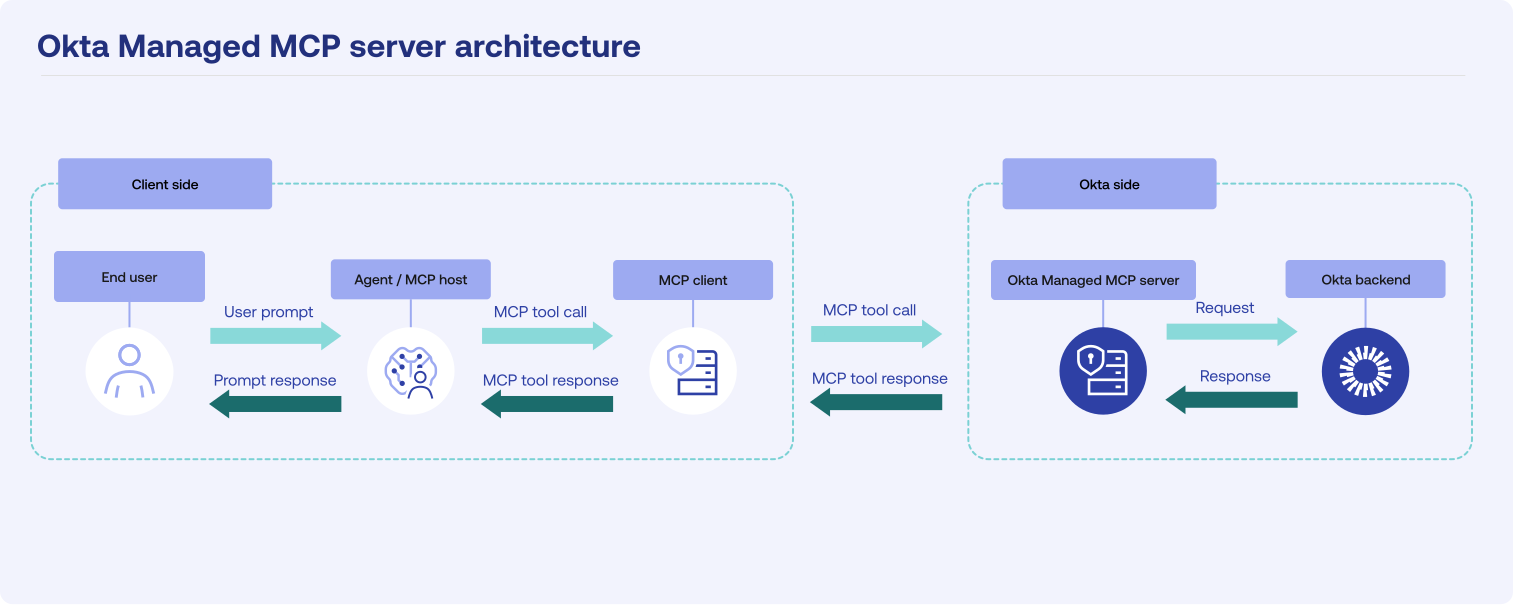
Incoming requests follow this path:
- An Okta admin or end user types a request into an MCP client such as VS Code.
- The MCP client connects the LLM to the Okta Managed MCP Server over HTTPS. The client handles the MCP protocol, including server discovery, authorization, and error handling.
- The MCP client sends the request securely over HTTPS to the Okta Managed MCP Server.
- The Okta Managed MCP Server verifies the OIDC session, checks the OAuth scopes, and validates all inputs against tool schemas.
- The Okta Managed MCP Server identifies the relevant Okta API, executes the operation, and retrieves the result.
- The Okta Managed MCP Server removes extra response fields from the Okta API response and returns a clean, concise result to the MCP client.
Architecture overview
The Okta Managed MCP Server handles all processing in the Okta cloud, so nothing runs on your local machine. When you type a prompt, your MCP client sends it securely over HTTPS to the Okta Managed MCP Server. The Okta Managed MCP Server validates your credentials, checks inputs against tool schemas, calls the relevant Okta APIs, and returns an optimized response to your MCP client.
The Okta Managed MCP Server limits API calls to protect your org from excessive requests. Okta's general API rate limits apply alongside the Okta Managed MCP Server endpoint rate limit of 100 requests per minute, per org. Your requests must stay within both limits, and whichever limit is reached first applies. If a client sends too many calls in a short period, the server returns an HTTP 429 response. For details on Okta's general API rate limits, see Rate limits.