Skip to main contentSkip to docs navigation
Docs
  • English (United States)
  • 日本語 (日本)
  • Français (France)
    • Identity Engine
    • Classic Engine
    • Access Gateway
    • Advanced Server Access
    • Aerial
    • Identity Security Posture Management
    • Workflows
    • Identity Engine
    • Classic Engine
    • Access Gateway
    • Advanced Server Access
    • Aerial
    • Identity Security Posture Management
    • Workflows
  • Okta Developer
    • Auth0 Docs
    • Auth0 FGA Docs
  • Training
  • Support
    • English (United States)
    • 日本語 (日本)
    • Français (France)

Feedback

OAG publication
  1. Integrate apps with Access Gateway
  2. Sample apps
  3. Add a sample policy application
  4. Add required access policy

Add required access policy

During this task we will examine and modify sample policy.

Examine policy for each specified URI.

  1. If required select the Policies tab.
  2. Review the Policy pane which includes a set of sample policies for various conditions.
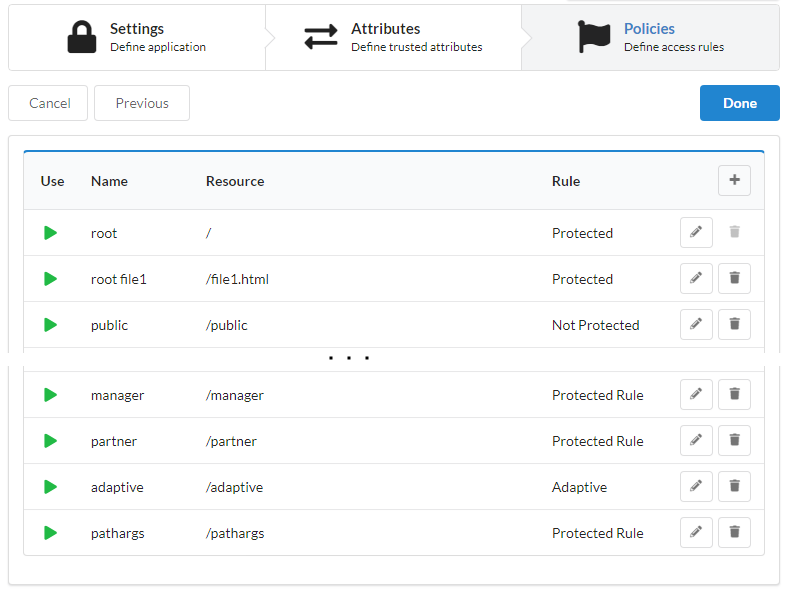
    Example policies predefined with sample policy application.
  3. Click Done. Access Gateway adds the new application and then redirects to the Applications tab.

Next steps

Test a sample policy application

© Okta, Inc. All Rights Reserved. Various trademarks held by their respective owners.

Top