Agent-to-agent connections
Learn about agent-to-agent connections in Okta.
Agent-to-agent connections let AI agents securely call each other as part of automated workflows. Depending on your workflow, an AI agent can act in one or both of the following roles:
- Caller: The agent that initiates the request and calls another agent.
- Resource: The agent that receives and validates the incoming request.
When you configure delegations for non-human identities, you need to configure a custom authorization server. This is what registers the AI agent as a protected resource that other agents and services can call. Unlike the standard Okta Org Authorization Server (which is strictly designed for authenticating human users), a custom authorization server lets you define the agent's audience URL (the unique identifier callers must use when requesting tokens for this specific AI agent). It also allows you to enforce fine-grained access policies for incoming agent-to-agent connections.
- Manual configuration: If you manually configure a calling agent, you must navigate to that specific agent's detail page and add a resource connection that explicitly points to the target resource agent's audience URL and custom authorization server.
- Automatic configuration: If you connect two AI agents together within the same workflow, Okta automatically establishes this resource connection between them. You can view these auto-created details on the Resource connections tab for both AI agents.
When one AI agent needs to call another AI agent, it must first ask a custom authorization server for a temporary access token. The custom authorization server checks the configured rules to confirm the connection is allowed, and grants tokens that are scoped to a specific resource and expire automatically. This step-by-step verification happens at every request, ensuring that no AI agent gets broad or permanent access to your org.
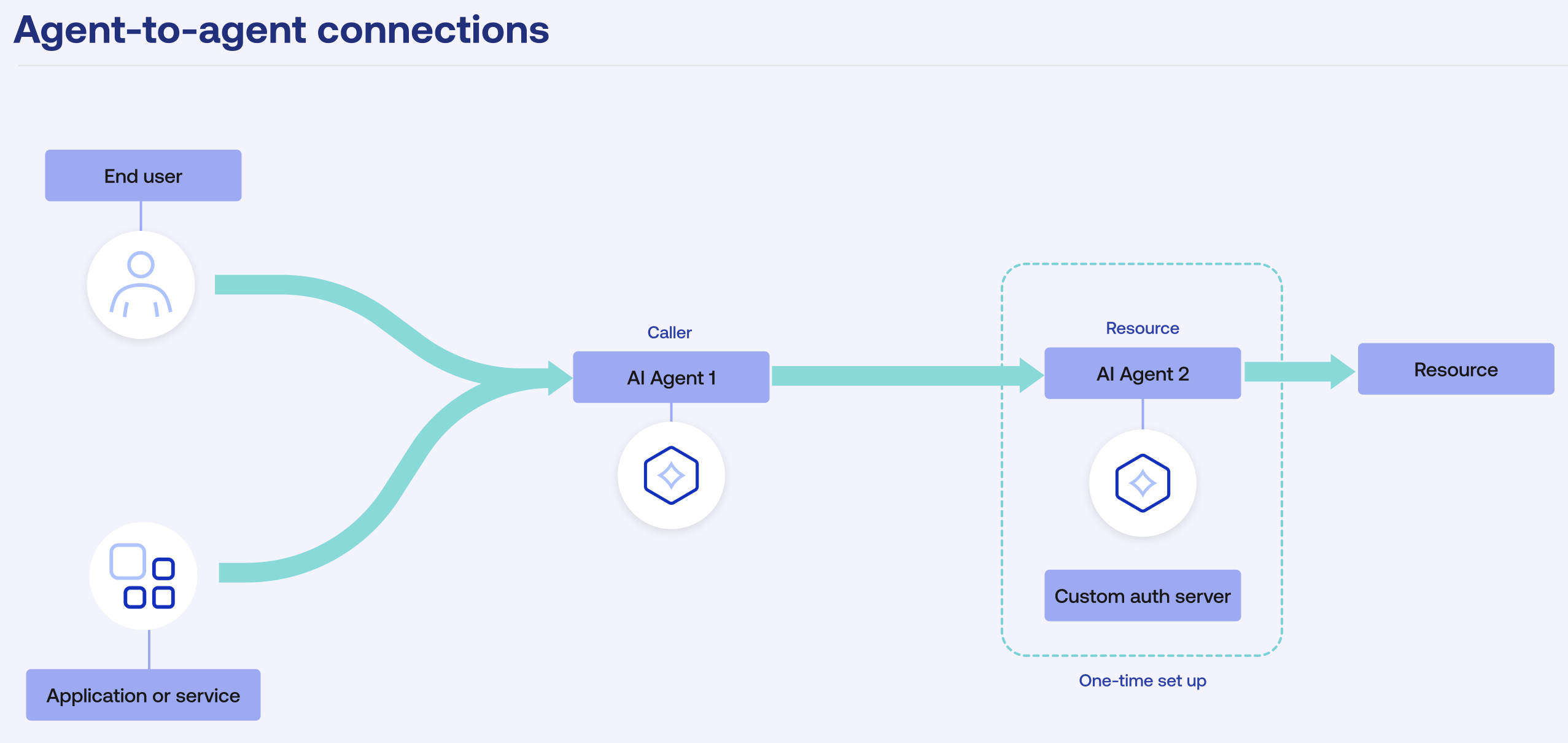
As the AI agents work together, the system builds a digital chain of delegation. This chain is stamped into the access token, recording exactly which agent started the request, who it connected to next, and the precise order of those events. It also includes the ID of the subject and its type, so you can easily see if the caller is a user, app, or another AI agent. By keeping this clear, step-by-step record, you can use the System Log to easily identify errors when a process breaks, watch out for unusual activity, and make sure every automated connection is fully monitored.
For information on how agent-to-agent token exchange works, see the Set up AI agent-to-agent token exchange developer guide.
How it works
- Add and register AI agents in Okta. You can add them manually or import them from an app. See Add AI agents.
- Configure the non-human identities that can call the AI agent. See Add delegations in Add AI agents manually or Configure imported AI agents.
- If you connect two AI agents, Okta automatically establishes a resource connection between them. You can see the details of resource connection on the Resource connections tab for both AI agents. See AI agent resource connections.