Database integrations
Okta Privileged Access for databases helps minimize the risks associated with static, under-managed database user accounts on your supported database instances. Database accounts are onboarded to Okta Privileged Access according to rules that you define, after which their passwords are rotated and securely vaulted. Users gain access to these passwords based on security policy rules that you set, such as MFA and manual approvals. Passwords are rotated automatically on a set schedule and when time-bound checkouts expire. All user and system actions are logged to Okta's System Log to ensure visibility and compliance.
To get started, see Set up your first database integration.
Learn about which database types and versions are supported in Okta Privileged Access.
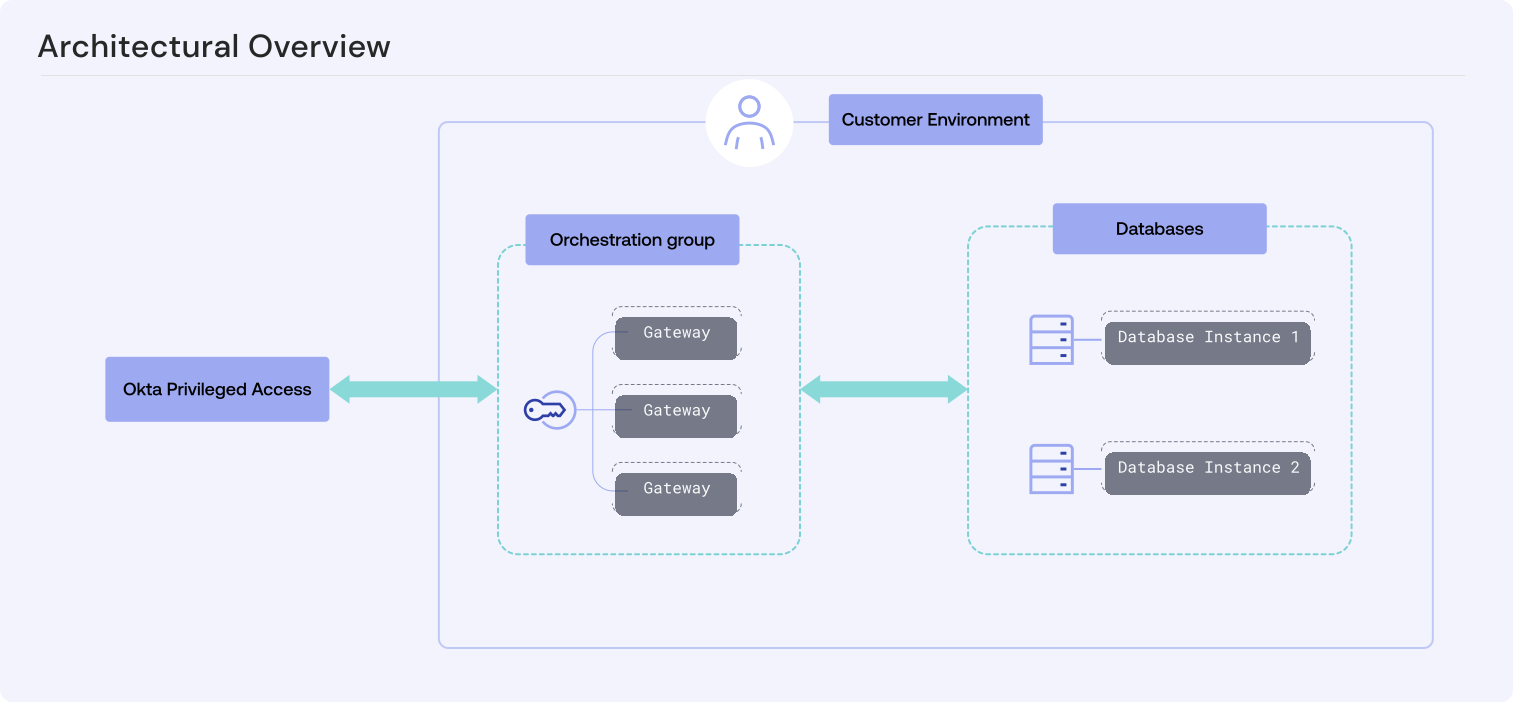
The following diagram shows how Okta Privileged Access connects to your databases.
Key features
-
Account selection: You set rules that choose which database accounts Okta Privileged Access manages.
-
Password rotation: Okta Privileged Access takes over each account that it manages and stores that account's password in a secure vault. It then changes the password on a set schedule, at an admin's request, or when a user's exclusive checkout expires.
-
Security policies: You control which users can access specific database accounts and the order in which access checks, such as MFA or manual approval, are applied.
-
Activity logging: Okta Privileged Access records what every user and system does.
Key concepts
- Database target
-
The database target defines the scope of access and operations for the integration. The following table shows what an integration manages for each database type.
Database type Database target MariaDB, Microsoft SQL Server, MySQL, PostgreSQL The database instances themselves. MongoDB A specific database on a database instance (authentication database). Oracle Database A specific container: the CDB root, an application root, or a PDB. - Gateway
-
Gateways are lightweight servers that you deploy in your environment to act as a bridge between Okta Privileged Access and your databases. A gateway can service database integrations only when it's enrolled using a gateway setup token that's configured with the Infrastructure orchestrator role. See Create gateway tokens.
All gateways enrolled with the same setup token belong to the same orchestration group, and each integration is assigned to one orchestration group. Enrolling more than one gateway in a group therefore adds redundancy, and you can use the same orchestration group for multiple integrations. See Okta Privileged Access gateways.
- Integration
-
A permanent configuration in Okta Privileged Access that represents one database target. Resource admins create integrations in the Okta Privileged Access Admin Console.
You can create only one integration for each database target, which Okta Privileged Access enforces at the team or tenant level. Okta Privileged Access also prevents integrations with read-only database instances.
CAUTION:Don't create duplicate integrations using different Okta Privileged Access tenants. Enforcement applies within a team or tenant, not across them, so duplicates created from separate tenants aren't detected and cause unexpected and undesired outcomes.
- Integration user
-
A dedicated database user account that you create on the database instance. The gateway connects as this user to perform account discovery and password rotation, as instructed by Okta Privileged Access in response to user actions or automated system actions.
You supply this user's username and password when you create an integration, and Okta Privileged Access vaults them securely. The user must also have specific privileges for database integrations to work. See Database integration user privileges.