Okta Privileged Access gateways
A gateway is a lightweight server or virtual machine that you deploy in your own infrastructure to bridge Okta Privileged Access and the resources that you manage. Each gateway operates in one of two roles, which you assign when you create the setup token used to enroll it.
Gateway roles
| Role | Purpose | How gateways are linked |
|---|---|---|
| Server access proxy |
Brokers and records SSH and RDP sessions to your Linux and Windows servers. Gateways in this role can replace SSH bastion servers or work alongside them, and they perform SSH session capture. See Session recording. |
Projects are linked to gateways by label. |
| Infrastructure orchestrator |
Provides access management for databases. A gateway configured as an infrastructure orchestrator discovers database user accounts and rotates their passwords on your database instances. See Infrastructure orchestrator gateways. |
Database integrations are linked to gateways by the orchestration group. |
Database integration creation fails if the gateway was enrolled as a Server access proxy, or if it's running a gateway version that doesn't support database integrations. Support for each database type was added over several gateway releases, so update the gateway to the latest version before you create a database integration. See Verify or update the gateway version for Ubuntu or Debian, or Verify or update the gateway version for Linux.
Server access proxy gateways
High availability
Gateways offer several mechanisms to guarantee high availability, allowing them to function as bastion hosts without the risk of a single point of failure. In addition to standard load balancing, gateways provide various mechanisms to ensure that access to your servers is always on. These mechanisms include built-in status checks and automatic load balancing when multiple gateways are enrolled with the same labels. See Okta Privileged Access gateway high availability.
The connection routing and load-balancing behavior described in that topic applies to gateways in the server access proxy role. Gateways in the infrastructure orchestrator role provide redundancy through orchestration group membership instead. See Orchestration groups.
Security
The following characteristics describe gateways in the server access proxy role, where they replace or supplement SSH bastions. Okta Privileged Access gateways are more secure than SSH bastions through their design, which includes:
Zero Trust
Standard SSH connections use some type of secret credentials (such as passwords, keys, or certificates) to connect to servers. While these credentials may only be valid for a short time, a compromised client or edge device can give an attacker direct access to a target server.
When using Okta Privileged Access gateways for your SSH connections, the client never receives any credentials that it can use on its own to directly SSH to a server. Instead, the client receives an encrypted payload that's forwarded to the gateway, which only the gateway can decrypt. The advantages of this approach include:
- A compromised client device never gives an attacker access to any credentials that can be used to directly SSH to the target server.
- Since access must pass through a gateway, it's easier to monitor access attempts using an intrusion detection system (IDs) or other monitoring tools.
Logical access management
Maintaining proper access control can be challenging, even when using SSH bastions. It's important to keep a record of user access permissions and maintain a record of which bastions can access which servers. The complexity increases when different bastions have varying security requirements based on the servers they can access.
Okta Privileged Access gateways reduce this complexity using labels. Labels determine which gateways are used to route connections to servers on a project. You can use labels to slice gateways by cloud region, compliance certification, operating system, or any key-value pair that you choose. Provided the labels and label selectors that you use on a project are accurate, you can be confident that the gateway used to access a target server meets your requirements.
For example, consider a data locality requirement that dictates that data must never leave a particular country's borders. In a legacy bastion environment, you need to audit all the target servers and bastion servers to ensure that the only possible access to the server is through a bastion server located within the country. When you use gateways, you can label the gateways with their operating region (for example, their AWS region). Instead of needing to audit individual servers, you add the region as a gateway selector to the project whose servers require such an access restriction.
Gateways can be powerful tools that you can use to meet compliance requirements, especially when used with Okta Privileged Access groups to manage users.
Native Identity Provider (IdP) integration
While SSH is a fantastic protocol for securing access to servers, it was designed before the advent of a federated Identity Provider. This resulted in its authorization scheme being centered on machine identity rather than human identity. SSH deals with users on servers, keys, and certificates, rather than organizations, company divisions, and human roles.
This leaves SSH bastions vulnerable to forms of side-channel attacks. Suppose that a user with sufficient access can modify the configuration of a bastion or target server. In that case, they can access target servers to bypass your Identity Provider. For example, imagine a scenario where a user with admin access to a server modifies its sshd configuration and installs their public key for unlogged access.
Gateways address this problem by being deeply entwined with Okta Privileged Access, rather than being a generic protocol like SSH. To pass through a gateway, users must have run the Okta Privileged Access client and be authenticated by Okta. This guarantees that all access to your servers behind gateways is protected by Okta.
Infrastructure orchestrator gateways
Database integrations are serviced by a gateway that's enrolled using a setup token configured for infrastructure orchestration. The gateway handles all direct communication with your database instances. It performs account discovery and password rotation on your behalf, so Okta Privileged Access never connects to a database instance directly. Because you run gateways in your own infrastructure, that traffic stays within your environment.
Infrastructure orchestration isn't enabled by default. Assign the Infrastructure orchestrator role to the setup token, and then enable orchestration in the gateway configuration file. See Configure the gateway to support database integrations.
Set up the gateway before you add a database integration. Integration creation fails if no gateway can reach the database instance. For the full sequence, see Set up your first database integration.
Orchestration groups
An orchestration group is a named set of gateways that are configured for infrastructure orchestration. Every setup token creates one orchestration group. You name the group when you create the Infrastructure orchestrator setup token, and every gateway enrolled with that token joins that group. See Create setup tokens.
When you add a database integration, you specify which orchestration group it uses. The gateways in that group carry out the account discovery and password rotation work for that integration.
Unlike server access proxy gateways, where projects are linked to gateways by the labels on each enrolled gateway, a database integration is linked to its gateways by the single orchestration group that you specify.
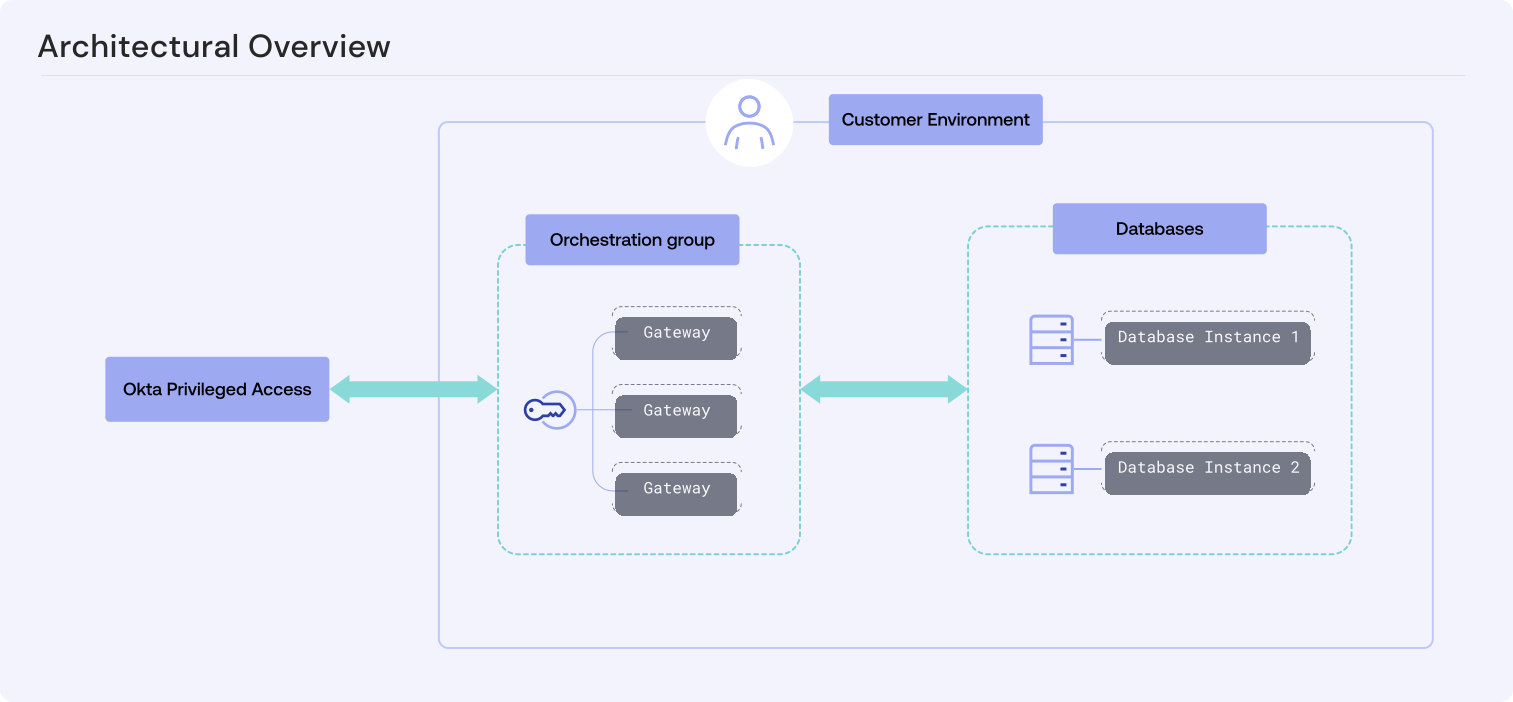
To add redundancy, enroll more than one gateway with the same orchestration group. Any gateway in the group can run the work for an integration that's assigned to it, so the integration keeps operating when a single gateway becomes unavailable. Every gateway in a group must be able to reach each database instance used by the integrations assigned to that group. A group whose gateways can't reach all of its target instances causes integration health to degrade. See Database integration health status.
Network requirements for orchestrator gateways
A gateway in the infrastructure orchestrator role requires the following network access:
-
Outbound access to Okta Privileged Access on port 443. This means access to the production and preview Okta Privileged Access domains by DNS name, not to specific IP addresses. For the domains, see Okta Privileged Access port requirements.
-
Outbound access to each database instance that it services, on that instance's listener port. For example, port 5432 for PostgreSQL or port 3306 for MySQL.
Regardless of whether your database is deployed on premises, on cloud infrastructure, or on a platform as a service (PaaS) offering, it always requires a gateway. See Supported database types, versions, and deployment options and Network access by environment.