Use cases for the Okta Managed MCP Server
Learn how to use the Okta Managed MCP Server to streamline your org's admin tasks.
Early Access release
Overview
The Okta Managed MCP Server enables Okta admins and end users to manage their Okta org using natural language. Instead of navigating complex admin interfaces or writing API calls, you can simply ask questions and request actions through an AI agent.
The Okta Managed MCP Server intelligently routes your requests to the right tool, validates your permissions, and executes actions securely.
Key capabilities
- Natural language requests: Ask the AI agent what you need in plain English
- Scope-based security: Actions respect your Okta permissions automatically
- Built-in validation: Required fields and data formats are enforced
- Audit trails: Every action is logged for compliance
- Token optimization: Responses are optimized to reduce AI processing costs
- Multi-user support: Flexible tools to support both admins and end users
Available tools
The Okta Managed MCP Server provides the following tools for Identity and Access Management (IAM) and Okta Identity Governance (OIG) solutions. Each tool name links to a topic that describes its available actions and required Okta scopes. For the full list of scopes required by each tool, see the Scope-to-tool mapping section in Scope-based tool loading.
| Tool name | Type | Description |
|---|---|---|
okta_application_management
(App management) |
IAM | Manage apps and assignments |
okta_customization_management
(Customization management) |
IAM | Manage brands, themes, custom pages, email templates, custom domains, and email domains |
okta_device_management
(Device management) |
IAM | Manage device policies |
okta_identity_governance |
OIG | Run access certification campaigns, manage access requests, manage delegate appointments, manage entitlements and grants, browse and submit access requests (My requests), and manage your own governance delegate settings (My settings) |
okta_group_management
(Group management) |
IAM | Manage groups and memberships |
okta_access_management
(Policy management) |
IAM | Create and manage policies |
okta_syslog
(System Log management) |
IAM | Query System Log events |
okta_user_management
(User management) |
IAM | Create, update, list, get, deactivate, and delete users |
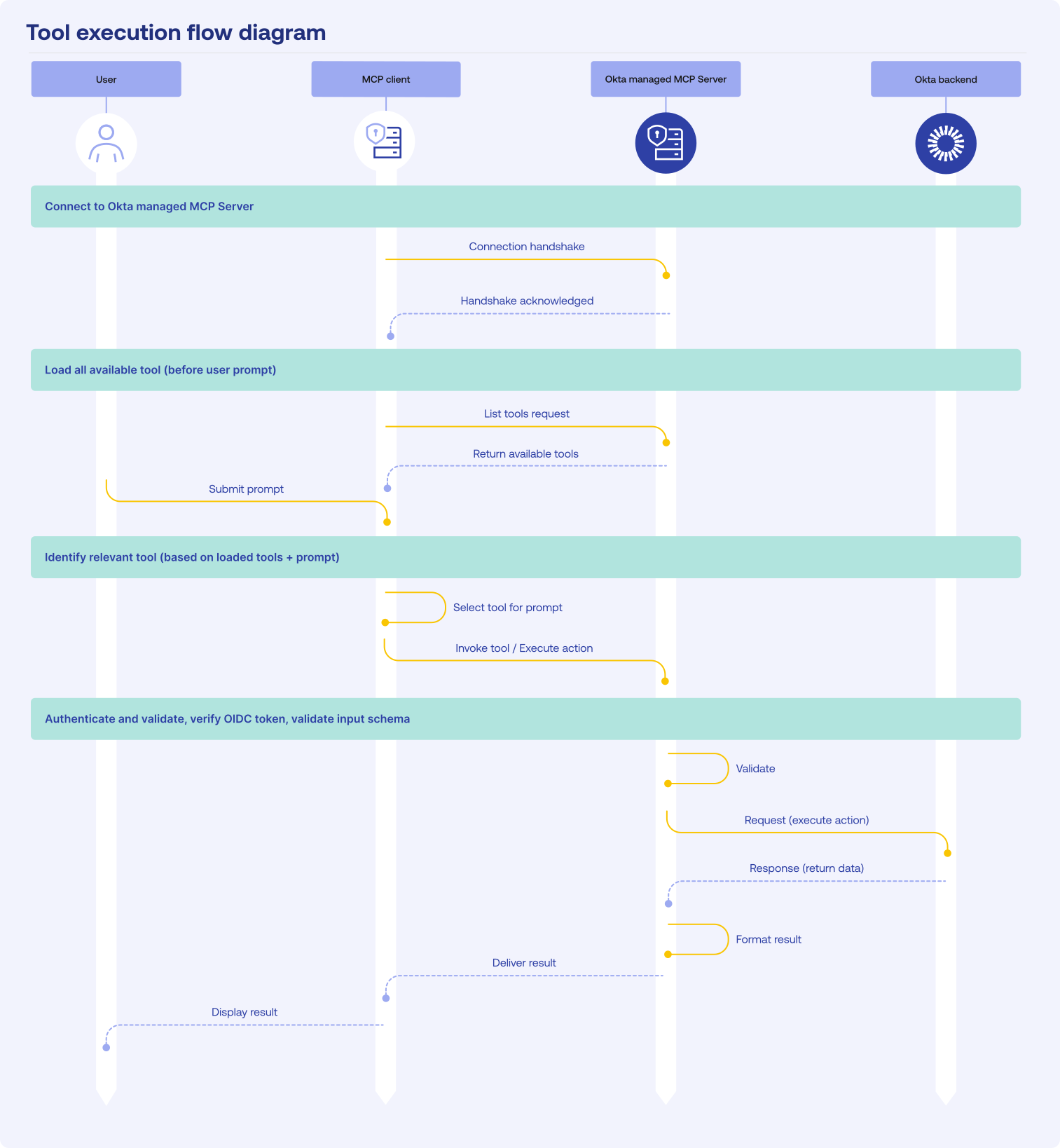
Tool execution flow
When you submit a prompt, the Okta Managed MCP Server follows this three-step process:
- Tool identification: The server recognizes the request and selects the appropriate tool.
- Action discovery: The server identifies the correct action for the tool to perform.
- Execution: The server runs the action within your parameters and returns results.