Add an Oracle JD Edwards app
The purpose of this tutorial is to go through the process of setting up an Oracle JD Edwards app with Okta through the Access Gateway Admin UI console.
Note:
This app uses header variables to exchange user information. You can use the Access Gateway sample header app. See Add a generic header app and Add a sample header app.
Architecture
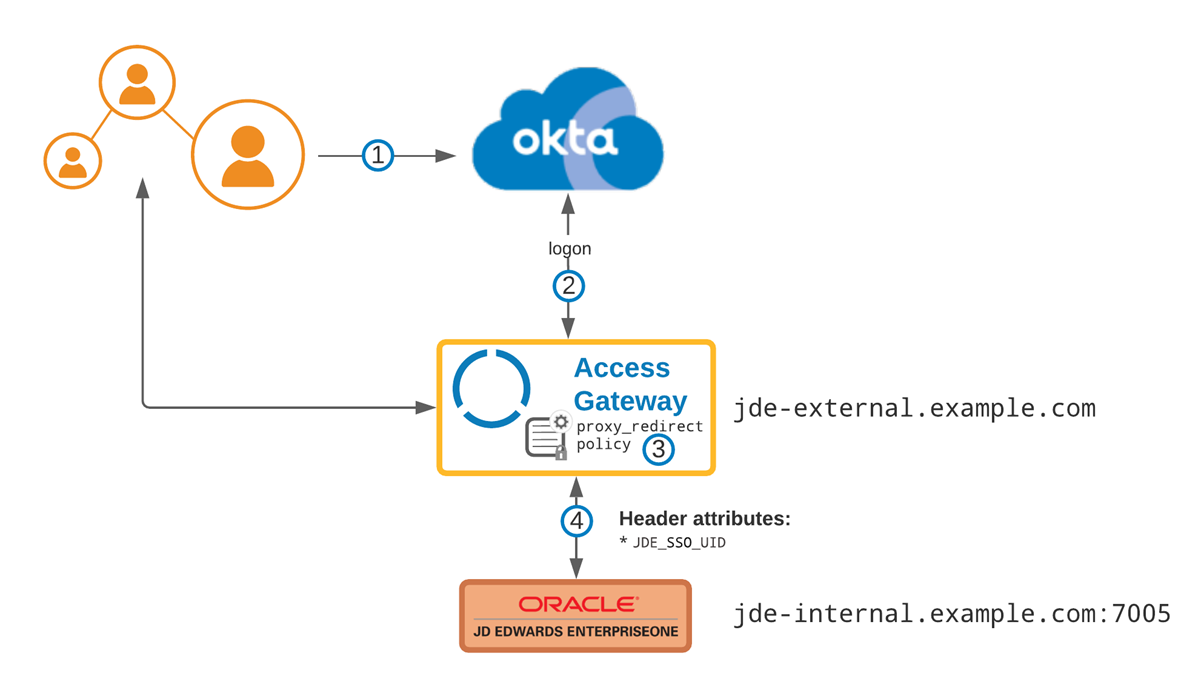
|
Flow
|
| See Oracle JD Edwards reference architecture. |
Before you begin
- Verify that you have access to the JD Edwards EnterpriseOne Server Manager Management Console and can configure SSO.
- Verify that the backing app is a supported JD Edwards app version 9 or later.
- Identify all required header attributes required for authentication.
- Ensure that appropriate DNS entries for both the header app and the external exposed new URL exist, as in this example:
Value Description https://jd-edwards-internal.example.comThe protected app URL (Access Gateway public domain). https://jd-edwards-external.example.comThe external legacy app URL.
Typical workflow
|
Task |
Description |
|---|---|
| Create a containing group |
Create an optional group to assign to the app. |
|
Enable SSO for JD Edwards apps. |
|
| Create an app |
Create the JD Edwards app and the required policy. |
| Test the app |
Test the app using header and policy simulation. |