Session protection
Session protection is a feature of the ITP risk engine that continuously monitors active sessions to detect and prevent session hijacking. It's comprised of two policies unique to ITP: the session violation detection policy and the session violation enforcement policy. These policies define your org's threshold for risk and record session violation detections.
After a user signs in and is in an active session, ITP receives signals whenever there's an IP change or a device change. Based on your policy configurations, ITP monitors these signals for signs of session hijacking and determines when to re-evaluate your global session policy and app sign-in policies. This is the continuous evaluation concept of ITP in practice: users must meet and maintain the requirements defined in your global session and app sign-in policies throughout their session lifetime.
Session protection strengthens your defense against session hijackers because it allows admins to configure automated remediation steps to take if the re-evaluation of those policies fails. And more importantly, it lets you configure when those steps are triggered, so you can isolate the risky violations and improve your users' experience.
Benefits
- Continuous evaluation of authentication requirements
- Users' sessions are protected beyond their initial authentication, and admins can ensure protection against threats like session hijacking.
- Efficient triage through reduction of noise and false positives
- Tailor ITP to your organization's security priorities to gain control and balance security with a seamless user experience. This can reduce support tickets from your users by limiting impact to only the events you have configured as meaningful for your organization.
- Configurable sensitivity
- Okta's risk engine provides risk output corresponding to the session context change. This helps you choose when to enforce re-evaluations, based on risk level sensitivity or a network-level allowlist.
- Different statuses for monitoring and enforcement
- Monitoring status lets you understand the risk patterns in your org and identify the detections that require policy re-evaluation. Move to Enforced when you're ready to start responding to violations.
How it works
During an active Okta session, the ITP risk engine logs changes to IP and device signals as user.session.context.change events. Session context changes are the events as they happen, like new IPs, shifts in ASN, or changes in device posture. They may be useful for audits or investigations, but they don't imply action or risk on their own. The ones that fail policy re-evaluation are logged as session violations, and these may indicate the presence of a threat.
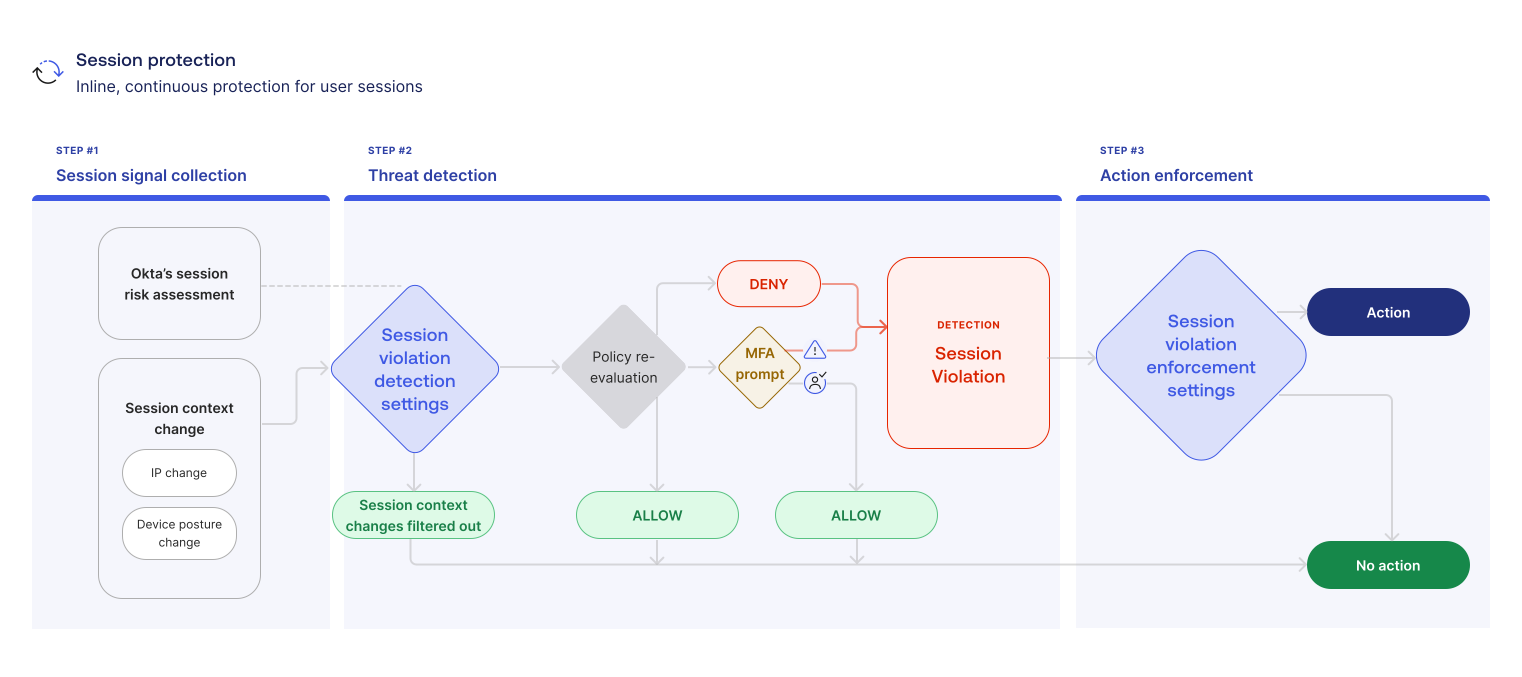
Session signals collection
ITP continuously monitors changes in IP and device signals to determine session risk.
Threat detection
Session violation detection settings filter out the session context changes that you allowlisted. The remaining context changes prompt a policy re-evaluation. The purpose of the re-evaluation is to determine if new session conditions match the conditions defined in your global session and app sign-in policies.
-
DENY means that the new session conditions don't satisfy your policy re-evaluation. A session violation is recorded:
policy.auth_reevaluate.fail. -
MFA prompt means that more verification is needed. If users don't provide the appropriate MFA, or if they're not interacting with an Okta page to receive the prompt, a session violation is recorded:
policy.auth_reevaluate.fail. -
ALLOW means that the new session conditions satisfy your policy re-evaluation, or that the user provided the appropriate MFA. No session violation is recorded.
If your session protection status is Monitoring, a DENY or MFA prompt is logged in the details of the policy.auth_reevaluate.fail event, but neither action occurs. The Monitoring flow ends here.
Action enforcement
If your session protection status is Enforced, users with a session violation are logged out of Okta and prompted for MFA. ITP runs an additional action (app logout or a custom workflow) if you set one up.