Integrate an Oracle E-Business Suite app with Access Gateway
Oracle E-Business Suite (EBS) apps differ from traditional apps in that Access Gateway creates and provides an EBS session cookie that's used by subsequent EBS calls. Access Gateway doesn't reverse proxy all EBS requests as it does with other app types.
There are two ways to integrate an EBS app with Access Gateway:
- Rapid process flow
- Classic process flow
Note: This app uses header variables to exchange user information. You can use the Access Gateway sample header app. See Add a generic header app and Add a sample header app.
EBS rapid process
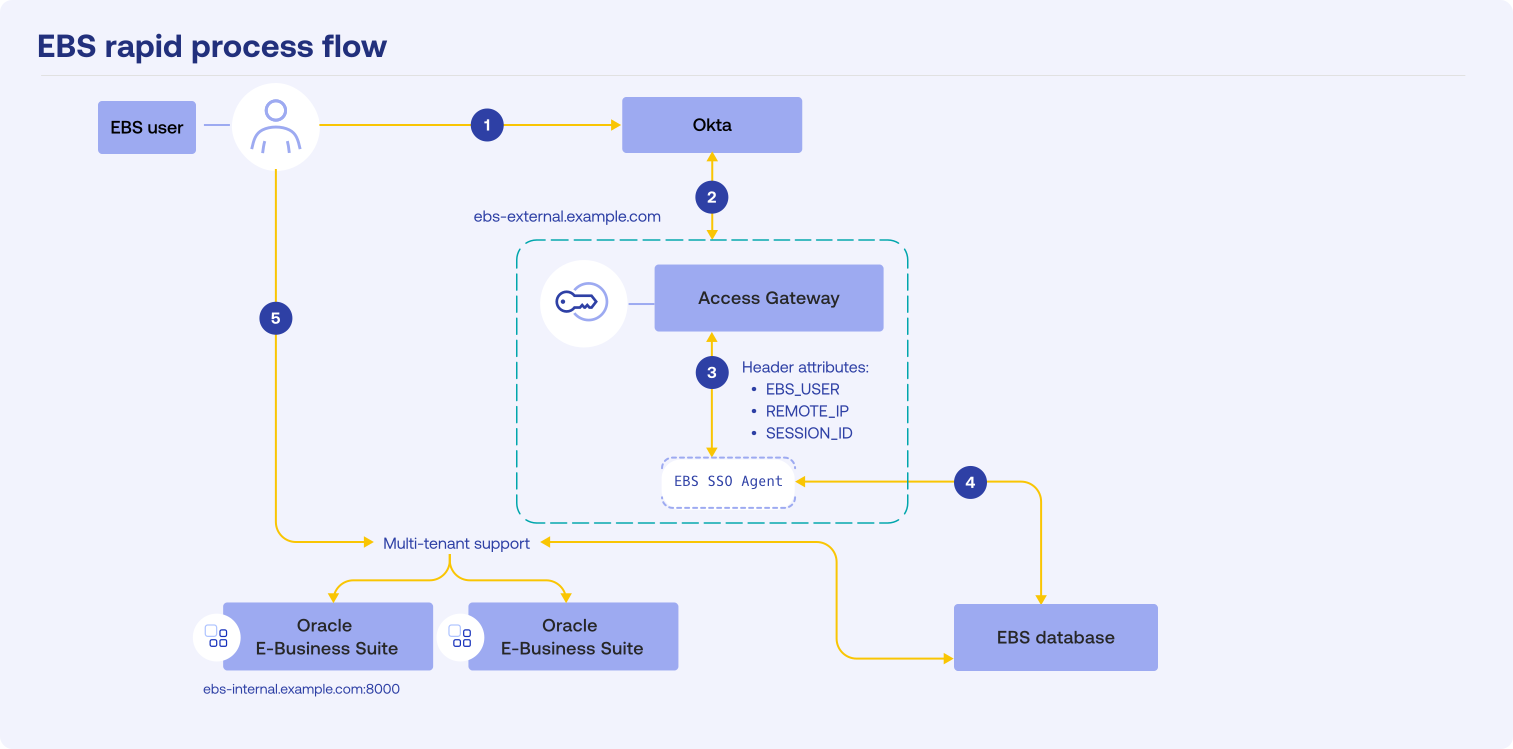
- The user signs in to Okta.
- Okta sends a SAML assertion to Access Gateway.
- Access Gateway sends the
EBS_Userheader toebs-ssoagenton Access Gateway. ebs-ssoagentverifies the EBS user against the database. After the user is authenticated, the database generates and issues a session cookie.- The user is redirected to EBS with the EBS session cookie.
See Oracle E-Business Suite with Access Gateway Rapid SSO reference architecture.
EBS classic process
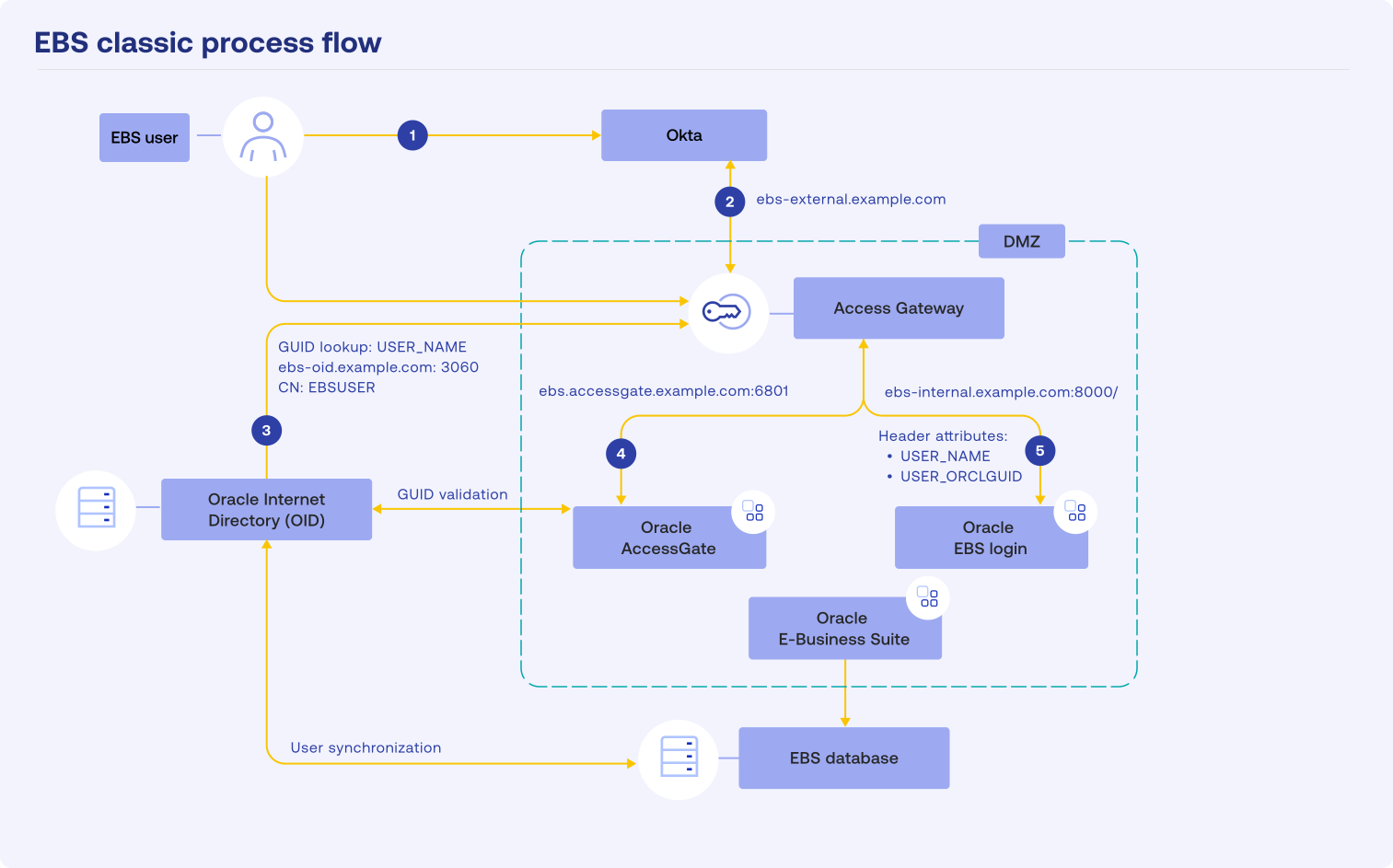
- The user signs in to Okta.
- Okta sends the user identity to Access Gateway.
- Access Gateway looks up the GUID using the EBS user identity.
- Access Gateway sends the GUID (header) or Oracle AccessGate, which generates an EBS cookie.
- The user is redirected to EBS with the EBS session cookie.
See Oracle E-Business Suite with Access Gateway Classic SSO reference architecture.
Before you begin
Ensure that you meet these requirements before you begin this procedure.
- Verify that Access Gateway is installed and configured. See Manage Access Gateway deployment.
- Verify that Access Gateway uses your Okta org as an identity provider (IdP). See Configure an Identity Provider in Access Gateway.
- Verify that you have administrator rights on your Okta org and can create groups and assign apps.
- Verify that the EBS version is supported. Access Gateway supports the following EBS versions:
- 12.1
- 12.2
- If you use the EBS classic process flow, ensure that EBS is configured with either Oracle AccessGate and Oracle Internet Directory (OID), or Oracle User Directory (OUD).
- If you use the EBS rapid process flow, ensure that you meet these requirements:
- Verify that EBS is configured and available.
- Verify that EBS_USER is mapped to an Okta org user.
- Verify that the EBS owner has created a DBC file and that it's available to the Access Gateway owner. Note: Rapid EBS SSO uses domain cookies to communicate between Access Gateway and the EBS server. The protected service and the externally facing instance of the gateway must use the same domain.
Workflow
- Optional. Create a group to assign to the app. See Add an Okta org group.
- Rapid process flow only. Configure EBS for use with Access Gateway and generate the required DBC file. See Configure Oracle E-Business Suite for Rapid SSO and create the DBC file.
- Create an app for either the rapid or classic EBS SSO. See Create the Rapid or Classic EBS app.
- Test the integration. See Test the Oracle E-Business Suite integration.
- Troubleshoot the integration. See Troubleshoot Oracle E-Business Suite apps.